Went round in circles for a bit with this one. This is what worked for me (Helios release)
Install SVN plugin from http://download.eclipse.org/technology/subversive/0.7/update-site/
Install connectors from http://community.polarion.com/projects/subversive/download/eclipse/2.0/update-site/
27 January 2011

25 January 2011
Proxy frustrations
Wasting heaps of time trying to access the eclipse & RAP CVS repositories from behind the company firewall & proxy. Been through all the help pages I can find but no success. The admins here say that SOCKS is not allowed but it ought to be possible to get at proxy.eclipse.org using port 80. Why is it not working?!
Grrrrr :-(
21 January 2011
Using the JFace forms package from the RAP incubator
I wanted to use the collapsible Section control so I downloaded the JFace Forms package from the RAP source repository :pserver:dev.eclipse.org:/cvsroot/rt .
Just import org.eclipse.rap.ui.forms and add to the main plugin Dependencies and it's done. As I understand it, the forms package is not yet official so I guess there might be some bugs. In fact, the section twistie doesn't react to the mouse click but the title section does so it's not a major problem.
19 January 2011
Coding vs Configuration
After a very frustrating afternoon trying to understand the configuration of ActionSets, Activities, Services etc - without success - I am wondering just how necessary it all is when writing a one-off RAP application. There is just the one plug-in and it will never be added to another plug-in set and will never have to co-operate or negotiate with other plug-ins.
So is it really necessary to do all this configuration? Can I do away with x layers of abstraction and just code the stuff I need directly? That would seem to be the pragmatic approach but I wonder what the consequences are are the project gets bigger.
18 January 2011
Role-based security in RAP
Been struggling this afternoon with role-dependent actions. I want to disable some actions unless the current user has the 'admin' role.
Found this document http://ftp.bredex.de/rcp-auth/RCP_Authorization.pdf which looks interesting. There is also a FAQ on the RAP site which covers this topic but I couldn't get it to work as I expected. The downloadable demo didn't function either :-(
More info found here https://bugs.eclipse.org/bugs/show_bug.cgi?id=71857
An article from IBM http://www.ibm.com/developerworks/opensource/library/os-ecl-rcpsec/index.html
RAP Wiki http://wiki.eclipse.org/RAP/Equinox_Security_Integration
Found this document http://ftp.bredex.de/rcp-auth/RCP_Authorization.pdf which looks interesting. There is also a FAQ on the RAP site which covers this topic but I couldn't get it to work as I expected. The downloadable demo didn't function either :-(
More info found here https://bugs.eclipse.org/bugs/show_bug.cgi?id=71857
You could try using the activities mechanism for this.
See
http://help.eclipse.org/help30/topic/org.eclipse.platform.doc.isv/guide/workbench_advext_activities.htm

You would:
- define separate activities corresponding to the different access levels
- define your actions in regular action sets, grouped according to access level
- associate each activity with the appropriate action sets via
activityPatternBinding elements
- set the enabled activity ids after authentication, early in the workbench
lifecycle, e.g. from your WorkbenchAdvisor's preStartup() method.

You may want to define dependencies between access levels (e.g. level A includes
level B) using the activityRequirementBinding element.

Note that this mechanism also supports dynamic changes to the set of enabled
activities.
An article from IBM http://www.ibm.com/developerworks/opensource/library/os-ecl-rcpsec/index.html
RAP Wiki http://wiki.eclipse.org/RAP/Equinox_Security_Integration
First simple app in RAP
Got my first simple RAP application running. I used the RAP Mail template to get started and have 2 views: one for navigation and the other to show details of the selection. The application I'm working on is for trade fair management.
There is still a lot of 'mail' stuff visible which I haven't been able to get rid of yet but here are a few things I did to customize the example.
The packaged examples are worth looking at. Locate 'org.eclipse.rap.design.example' and 'org.eclipse.rap.demo' in the Plug-ins view and then Import As -> Source project.
I find these a very useful reference and used a number of items from org.eclipse.rap.demo.controls.TableViewerTab for my navigation view.
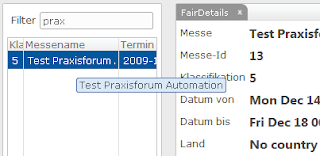
And the application now looks quite different.

There is still a lot of 'mail' stuff visible which I haven't been able to get rid of yet but here are a few things I did to customize the example.
- Refactor packages and classes to better reflect the application e.g. all 'mail' changed to 'fair'
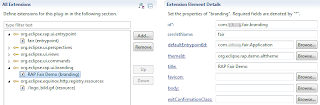
- plugin.xml -> Extensions -> ...ui.branding. Changed 'servletName' from 'mail' to 'fair'
- plugin.xml -> Extensions -> ...ui.entrypoint. Changed 'parameter' from 'mail' to 'fair'
The packaged examples are worth looking at. Locate 'org.eclipse.rap.design.example' and 'org.eclipse.rap.demo' in the Plug-ins view and then Import As -> Source project.
I find these a very useful reference and used a number of items from org.eclipse.rap.demo.controls.TableViewerTab for my navigation view.

As I don't like the branding I edited the plug-in to remove the template's branding and replaced it with a default.

And the application now looks quite different.

Subscribe to:
Posts (Atom)